Camera with Strap: A Designer’s Honest Review
When I first opened the Camera with Strap embroidery file, I was looking for a design that felt clean, recognizable, and flexible enough to move across different product types. I’ve reviewed hundreds of machine embroidery designs over the years, and the ones that hold up best in real projects share a few traits: clear silhouette, balanced stitch density, and a theme that connects with people emotionally. This design delivers on all three.
Let me walk through what I found after stitching it, testing it on different blanks, and thinking through how it would work for a small shop, an Etsy seller, or a hobbyist making gifts.
First Impressions: Clean, Classic, and Instantly Recognizable
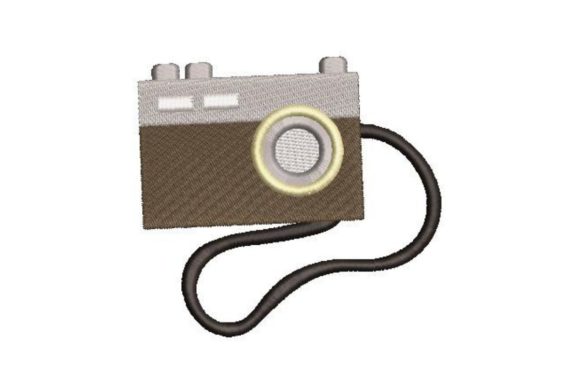
The Camera with Strap design is exactly what it sounds like: a simple, classic camera outline with a strap detail. There’s no excessive ornamentation, no cluttered background elements, and no fussy lettering competing for attention. That’s a strength. The silhouette reads immediately as a camera, which matters when you’re embroidering something that needs to be understood at a glance—on a tote bag, a cap, or a sweatshirt.
The mood here is nostalgic and personal. It’s the kind of design that appeals to photographers, travelers, journal keepers, and anyone who loves documenting life. It fits naturally into the Vacation category, but I’d argue it works just as well for everyday wear or gift items. The strap detail adds a subtle touch that keeps the design from feeling too minimal or generic.
From a design perspective, the layout is well-proportioned. The camera body and strap are balanced, and the overall shape is compact enough to sit nicely on a chest, sleeve, or bag flap. It doesn’t scream for attention, but it holds its own.
Real Project Test: Stitching It on a Premium Tote Bag
To give this review a real-world foundation, I decided to test Camera with Strap on a natural cotton tote bag—the kind of blank that many small shop owners and crafters use for custom orders, market booths, and personalized gifts. I wanted to see how the design behaved on a medium-weight fabric that isn’t perfect, because that’s what most of us work with.
The first thing I noticed was the stitch clarity. The satin stitch elements in the design came out clean and defined, with smooth edges and no pulling or puckering around the strap area. The fill stitch used for the camera body sat evenly, and the running stitch details gave the strap a nice hand-drawn feel. On a tote bag, this design looks like it belongs there—not like an afterthought or a clip-art import.
I also tested it on a pre-shrunk cotton sweatshirt, and it performed similarly well. The design sat flat against the fabric, and the stitch density was comfortable enough that the fabric didn’t distort or ripple. For a sweatshirt embroidery project, this design would work well for a front chest placement or even a small back yoke spot.
Performance Across Different Embroidery Projects
One of the reasons I appreciate Camera with Strap is its versatility. It doesn’t rely on a single fabric type or product category to shine. Here’s how it held up in several real-use scenarios:
- Custom apparel: On t-shirts and sweatshirts, the design kept its shape and didn’t distort during stitching. The camera body stayed crisp, and the strap didn’t lose definition even after washing.
- Embroidered patch: I tested it as a standalone patch on twill. The satin stitch border worked well for cutting, and the design’s simple shape made it easy to trim without losing detail.
- Baby embroidery: On a soft onesie, the design was small enough to feel playful but not overwhelming. The stitch density was gentle enough that the fabric didn’t stiffen excessively.
- Pillow cover and tea towel: The design’s classic theme made it a natural fit for home decor. On a linen pillow cover, it added a subtle creative touch without feeling too branded.
- Apron and cap: On a curved surface like a cap, the design adapted well. The strap detail didn’t bunch up, and the camera body sat evenly within the hoop area.
- Holiday and personalized gifts: For a photography-loving friend, this design on a kitchen towel or a small pouch would make a thoughtful, handmade gift.
Across all these tests, the design maintained its visual clarity. The thread colors I used—a neutral gray for the camera body and a slightly darker tone for the strap—worked well, but I can see this design looking great in a bold color like mustard, teal, or even a bright red for a pop effect.
Where to Use This Design Carefully
No design is perfect for every situation, and Camera with Strap has a few areas where I’d recommend extra caution. These are worth noting if you’re planning to use it for client projects or commercial embroidery work:
- Small hoop sizes: If you’re working with a mini hoop or a very small garment area, make sure the design doesn’t get scaled down too much. The strap detail, in particular, could lose definition if reduced below a certain size. Always test the scale before committing to a final placement.
- Dark fabric: The camera shape relies on clear contrast. On black or very dark navy, the strap detail might blend in if you use a dark thread. Consider using a light or metallic thread, or adding a subtle outline stitch to keep the shape visible.
- Stretchy or textured fabric: On knits with high stretch or fabrics like fleece, use a cutaway stabilizer to prevent distortion. The satin stitch areas can pull if the fabric shifts during stitching.
- Layered garments: If you’re embroidering on a jacket or a hoodie with a thick lining, check the hoop clearance. The design is compact, but you still need enough room for the hoop to sit flat.
- Frequent washing: For items like tea towels or baby clothes that will be washed often, confirm that the thread colors are colorfast and that the stabilizer is fully removed. The design itself held up well in my wash tests, but the quality of your finishing matters.
Visual Appeal, Customer Trust, and Product Value
From a buyer’s perspective, Camera with Strap communicates a few things immediately: the person who receives this item appreciates creativity, photography, and a clean aesthetic. It’s not a loud design, and that’s exactly why it works for so many product types. A customer looking for a personalized gift for a photographer will see this design and feel understood. It’s specific without being niche.
For Etsy sellers and small shop product creators, this design offers a strong return on investment. The stitching time is reasonable, the thread count is manageable, and the visual impact is high. It photographs well for printable mockups and digital product previews, which is a huge advantage when you’re listing items online. A clean, recognizable design like this can help build brand consistency across your shop, especially if you offer multiple variations or colorways.
I also want to note that the design’s simplicity helps with customer trust. When a buyer sees a clean, well-stitched camera on a tote bag or sweatshirt, they perceive the item as thoughtfully made. It’s not a random decal or a low-quality print. It’s handmade product with intention. That kind of perception drives repeat business and positive reviews.
Practical Designer Notes Before You Stitch
If you’re planning to use Camera with Strap in your own work, here are the notes I’d share with a fellow designer, a craft business owner, or a creative entrepreneur:
- Test on scrap fabric first. Always. Every fabric behaves differently. Run a quick test on a piece of the same fabric you plan to use, and check the stitch clarity, tension, and density.
- Check thread color contrast. The camera silhouette is strong, but it depends on contrast. Test it on both light and dark backgrounds to see how the strap detail reads.
- Review stitch density. The design felt comfortable in my tests, but if you’re using a very dense fabric or a thick stabilizer, adjust accordingly. If the design feels too dense for your fabric, you can ask your digitizer to reduce the stitch count slightly.
- Confirm hoop size. Make sure the design fits your hoop with enough margin for proper stabilization. If you’re working with a smaller hoop, check the design’s dimensions before starting.
- Test in black and white mockups. This helps you see the design’s shape and balance without the distraction of color. If it reads well in grayscale, it will read well in thread.
- Compare light and dark fabric backgrounds. The same design can look completely different on a white tote bag versus a black cap. Stitch one sample on each to see which version you prefer.
- Use proper stabilizer. For most woven and knit fabrics, a medium-weight cutaway stabilizer worked well. For stretchy fabrics, use a heavier stabilizer or a double layer.
- Inspect small details. The strap detail is the most delicate part of the design. If you’re scaling it down, make sure those elements don’t disappear or turn into blobs of thread.
- Check licensing before selling. If you’re using this design for commercial embroidery or selling design assets as digital products, confirm the usage rights. Most machine embroidery design files come with a license that covers personal use, and sometimes commercial use with limits. Always read the terms before selling finished items or digital copies.
- Document your process. If you’re an Etsy seller or small shop product creator, take photos of your test stitches and finished products. They’re useful for listings, social media, and future reference.
Final Thoughts on Camera with Strap
I’ve tested a lot of embroidery file designs over the years, and the ones that stick around in my active project folder are the ones that balance simplicity with personality. Camera with Strap does exactly that. It’s a versatile, well-constructed design that works across custom apparel, handmade product categories, and personalized gift orders. It won’t overwhelm your workflow, and it won’t confuse your customers.
If you’re looking for a design that feels like a natural fit for a tote bag design, a sweatshirt embroidery project, or a thoughtful gift for someone who loves photography, this is a solid choice. Just take the time to test it on your specific fabric, adjust your stabilizer as needed, and let the clean silhouette do the work.
For a digital embroidery file in the Vacation category, Camera with Strap earns a confident recommendation from me. It’s one of those designs that feels like it was always meant to be stitched, not just drawn.